








Elite Data Backup for Windows
- Paid
- 4.1
- 15
- V1.5.0
Download for Windows
View an ad to download for free

- Genius IT Systems
Data Backup Software with Scheduled Automatic Backups to Google Drive, One Drive & Local Storage
Elite Data Backup – Automated Cloud Backup Software for Windows
Elite Data Backup is a powerful and easy-to-use cloud backup solution designed to protect important business and personal data from accidental loss, hardware failure, ransomware incidents, system crashes, and human error. Built for Windows environments, the software automates the backup process and helps ensure that critical files remain securely stored in the cloud without requiring constant manual intervention.
Whether you are a small business owner, accountant, consultant, startup, educational institution, healthcare professional, freelancer, or individual user, Elite Data Backup helps safeguard your valuable data through automated and scheduled backups.
Automated Backup Protection
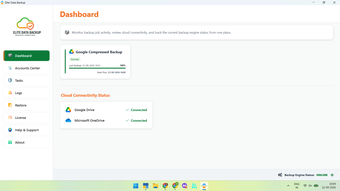
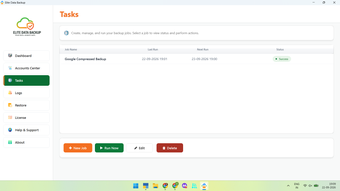
One of the most common causes of data loss is simply forgetting to perform regular backups. Elite Data Backup eliminates this risk by automating the entire backup process. Users can create backup jobs that run on predefined schedules, ensuring that important files and folders are backed up consistently without relying on manual action.
Cloud Backup Integration
Elite Data Backup integrates seamlessly with popular cloud storage platforms including Google Drive and Microsoft OneDrive. Unlike many cloud backup providers that require customers to store data on third-party servers, Elite Data Backup allows users to utilize their own cloud storage accounts, providing greater control, ownership, and transparency over their data.
Continuous Data Protection
The software includes Continuous Data Protection (CDP) capabilities, allowing files to be backed up even while they are open or actively being used. This helps ensure that the latest versions of important documents, spreadsheets, databases, and business records are protected.
Enterprise-Grade Security
Security is a core component of Elite Data Backup. Data is protected using AES-256 encryption, one of the most trusted encryption standards used by organizations worldwide. This helps safeguard sensitive business and personal information during backup operations.
Intelligent Compression
To optimize storage utilization and reduce upload times, Elite Data Backup compresses data before transmission. Compression ratios can reach up to 8x depending on the file type, helping users maximize available cloud storage space while improving backup efficiency.
Flexible Backup Destinations
In addition to cloud storage, Elite Data Backup supports multiple backup destinations, including:
• Google Drive• Microsoft OneDrive• Network Storage• NAS Devices• Removable Drives• Local Storage
Organizations can implement backup redundancy strategies by maintaining multiple backup copies across different locations.
Version Retention and Recovery
The software supports retention policies with version history for up to 30 days. This enables users to recover previous file versions when needed and provides additional protection against accidental modifications, deletions, or data corruption.
Multi-Account Support
Elite Data Backup supports multiple cloud storage accounts, allowing businesses and advanced users to distribute backup workloads across several Google Drive and OneDrive accounts based on operational requirements.
Designed for Businesses and Professionals
Elite Data Backup is particularly useful for organizations that depend on business-critical data, including accounting firms, tax consultants, law offices, medical clinics, schools, retailers, manufacturers, distributors, and service providers. It is also well suited for users of accounting and business software where regular backup of financial and operational records is essential.
Key Features
• Automated and scheduled backups• Manual backup execution option• Google Drive integration• Microsoft OneDrive integration• Continuous Data Protection (CDP)• AES-256 encryption• Data compression up to 8x• Multiple cloud account support• Network, NAS and local backup support• Backup retention up to 30 days• Backup monitoring and job logs• Intelligent retry and Missed task catchup • Windows 10 and Windows 11 support• Windows Server support
Loading…
App specs
Developer
- Genius IT Systems
License
Full
Version
1.5.0
Latest update
Platform
Windows
OS
Windows Server
Language
English
Downloads
15
Last month's downloads
- 15
Size
16.61 MB
Elite Data Backup for PC
- Paid
- 4.1
- 15
- V1.5.0
Download for PC
View an ad to download for free
User reviews about Elite Data Backup
Have you tried Elite Data Backup? Be the first to leave your opinion!
Add reviewTop downloads File managers for Windows
Top downloads File managers for Windows
Top downloads File managers for Windows
Related topics about Elite Data Backup
Latest articles

Assassin’s Creed Black Flag Resynced: New Game Plus hits PS5 next week

Apple Music now hides a playable iPod on its website: there’s Breakout too

Red Dead Online Halloween event is back: Dead of Night returns with 4x rewards

Clayface’s Aaron Paul cameo: why he appears only briefly

Apple iPhone Duo goes on sale: its first foldable hits stores
Laws concerning the use of this software vary from country to country. We do not encourage or condone the use of this program if it is in violation of these laws. Softonic may receive a referral fee if you click or buy any of the products featured here.